<?xml version="1.0" encoding="utf-8"?><feed xmlns="http://www.w3.org/2005/Atom" ><generator uri="https://jekyllrb.com/" version="4.1.1">Jekyll</generator><link href="https://orangejuiceliberationfront.com/feed.xml" rel="self" type="application/atom+xml" /><link href="https://orangejuiceliberationfront.com/" rel="alternate" type="text/html" /><updated>2025-03-01T09:32:20+01:00</updated><id>https://orangejuiceliberationfront.com/feed.xml</id><title type="html">Orange Juice Liberation Front</title><subtitle>Uli's blog on programming, game development, pop culture and other boring things.</subtitle><author><name>Witness of TeachText</name></author><entry><title type="html">Pilky</title><link href="https://orangejuiceliberationfront.com/pilky/" rel="alternate" type="text/html" title="Pilky" /><published>2025-03-01T00:00:00+01:00</published><updated>2025-03-01T00:00:00+01:00</updated><id>https://orangejuiceliberationfront.com/pilky</id><content type="html" xml:base="https://orangejuiceliberationfront.com/pilky/"><![CDATA[<p><img src="/images/2025/03/pilky_landed_after_gravity_bomb.png" alt="Pilky's avatar in his spaceship, after gravity was reactivated" /></p>

<p>On February 14th, 2025, Martin Pilkington died.</p>

<p>I don’t remember exactly where I first met Martin. We probably both hung out on Apple’s
Cocoa-Dev mailing list or other online spaces, but we first met in person at NSConference,
I’m sure. He was immediately likeable, impossibly young, and full of ideas. He made Mac
apps and knew a lot. It was fun to talk shop. You could help him out, he could help you
out, and everyone came out a smarter, more optimistic person.</p>

<p>After Scotty closed down NSConference, we didn’t run into each other that often anymore.
We followed each other on Twitter, and I learned about his first encounter with cancer,
and how he’d managed to get past it, and I learned about the apps his M Cubed Software
worked on, and we had lots of fun conversations and polite disagreements about things
going on in the Apple world. But we didn’t run into each other much, beyond 160-character
bursts here and there.</p>

<p>Until a few years ago, he created PilkyCRC on Twitch. There he was, doing what you’d now
call a body-doubling stream, of him working on his newest app Coppice, updating his web
site, and just conversing with viewers about lots of development questions. He freely gave
advice, he also graciously took it. Coppice was a gorgeous mind-mapping app. You just
placed stuff on a canvas, dragged connection noodles between them, and there were so many
clever small touches to reduce friction in the process. And it looked like it had been
built and refined by a team of 20, not a clever young man from the North West of England.
But here he was, on stream, building away at it, line by line, both textual and graphical.</p>

<p>Also, he had an amazing setup with a virtual avatar. A 3D-rendered “desk lamp”-style iMac
avatar with a face that moved as he spoke. He could push buttons and “Pilky” got angry,
desperate, went to sleep … eventually he built an amazing Unity setup. A spaceship with
multiple rooms, projection screens to show his screen capture when working on code, or
rooms little Pilky iMac could move to for some change of scenery.</p>

<p>There were channel point redeems, where you could spend the “currency” that every viewer
accumulates per minute watched to throw “bugs” at him, or turn off gravity, making him
float around the space and hearing Martin act everything out hilariously. He also drew
the cutest emotes of his avatar. It was nice to have him back, to have those conversations
again, to benefit from his experience and pick his brain. To hear him act the grumpy
curmudgeon and to hear him laugh.</p>

<p>Then he had a doctor’s visit, symptoms he hadn’t seen before, and the doctors said the
cancer was back. As someone who only saw his public face on the ‘net, I don’t know what
his immediate reaction was (probably like any of us would react), but by the time I heard
about it, Pilky was raring to fight this thing. Do everything he can.</p>

<p>But it had advanced too far, it wasn’t looking good. The day came, sometime late in 2024,
when he announced that he was in the process of sorting his affairs.</p>

<p>Fuck he was young.</p>

<p>Fuck he was brave.</p>

<p>And Fuck Cancer.</p>]]></content><author><name>uliwitness</name></author><summary type="html"><![CDATA[]]></summary></entry><entry><title type="html">How do headers like C’s stdint.h work?</title><link href="https://orangejuiceliberationfront.com/how-do-headers-like-stdint-work/" rel="alternate" type="text/html" title="How do headers like C’s stdint.h work?" /><published>2025-01-25T00:00:00+01:00</published><updated>2025-01-25T00:00:00+01:00</updated><id>https://orangejuiceliberationfront.com/how-do-headers-like-stdint-work</id><content type="html" xml:base="https://orangejuiceliberationfront.com/how-do-headers-like-stdint-work/"><![CDATA[<p>C comes with a header named <code class="language-plaintext highlighter-rouge">&lt;stdint.h&gt;</code>, which defines types like
<code class="language-plaintext highlighter-rouge">int64_t</code> and <code class="language-plaintext highlighter-rouge">uint8_t</code>. But how does that work? How does a header tell
C to “invent” a new type of integer? And what about types like <code class="language-plaintext highlighter-rouge">long</code>
and <code class="language-plaintext highlighter-rouge">short</code> ?</p>

<h2 id="under-the-hood">Under the Hood</h2>

<p>A C compiler eventually needs to compile to machine code. Machine code
only has hard, fixed-width types like a 32-bit int, 64-bit int etc. (or
rather, it has memory blocks of that size + operations that operate on
memory of that size and either treat it as signed or unsigned)</p>

<p>The people who created your compiler need to generate these
instructions, so had to hard-code a few built-in numeric types. Let’s
say they called them <code class="language-plaintext highlighter-rouge">__int64</code>, <code class="language-plaintext highlighter-rouge">__int32</code>, <code class="language-plaintext highlighter-rouge">__int8</code>, <code class="language-plaintext highlighter-rouge">__int16</code>,
<code class="language-plaintext highlighter-rouge">__uint64</code>, <code class="language-plaintext highlighter-rouge">__uint32</code>, <code class="language-plaintext highlighter-rouge">__uint8</code> and <code class="language-plaintext highlighter-rouge">__uint16</code>. These are
<em>non-standard</em> type names specific to this compiler.</p>

<h2 id="unpredictably-sized-types">Unpredictably-sized Types</h2>

<p>In addition, they define <code class="language-plaintext highlighter-rouge">long</code>, <code class="language-plaintext highlighter-rouge">short</code> etc. as synonyms for these
types. These are standard type names that have been around since the
birth of C. However, they are not of a fixed size. There are just a few
vague rules how these types must relate to each other.</p>

<p>And not all of them are still followed in practice. E.g. the
recommendation is that <code class="language-plaintext highlighter-rouge">int</code> should be the “native” number type of the
computer’s CPU. The one that’s the fastest. But when modern operating
systems switched from 32-bit to 64-bit CPUs, they didn’t want everyone
to have to rewrite their code. So most 64-bit platforms use a 32-bit
<code class="language-plaintext highlighter-rouge">int</code>, even though a 64-bit number would be the more natural, correct
choice.</p>

<h2 id="not-breaking-existing-code">Not Breaking Existing Code</h2>

<p>To give programmers more control over what size types are, without
having to know about the size of <code class="language-plaintext highlighter-rouge">long</code> or <code class="language-plaintext highlighter-rouge">short</code> on every computer,
the new fixed-size types like <code class="language-plaintext highlighter-rouge">int32_t</code> were added, a few years later.
But now the problem was that some people had already added their own
type named <code class="language-plaintext highlighter-rouge">int32_t</code> to their code, and their code would have stopped
compiling if it was just added to the compiler.</p>

<p>So we have the compiler-specific <code class="language-plaintext highlighter-rouge">__int64</code> type, and know that this is
the name you need to give to get a 64-bit signed integer. They chose
this name, because the C standard says that type names starting with two
underscores are reserved for the compiler maker, so there is no chance
of existing C code using the name <code class="language-plaintext highlighter-rouge">__int64</code> already.</p>

<p>This is fine to old code, from the days where <code class="language-plaintext highlighter-rouge">int64_t</code> didn’t exist.
The only new thing is the <code class="language-plaintext highlighter-rouge">__int64</code> type. Unless the old code’s dev
wrote evil code, nothing has changed, no name can collide and that code
will still compile.</p>

<h2 id="making-the-standard-name-available-on-request">Making the Standard Name Available on Request</h2>

<p>But the people who create your compiler are also the ones who write the
<code class="language-plaintext highlighter-rouge">&lt;stdint.h&gt;</code> header file. They can use it as a kind of documentation of
what they did.</p>

<p>If the compiler writers add a <code class="language-plaintext highlighter-rouge">typedef __int64 int64_t;</code> to this
header, that will make sure that the standard name <code class="language-plaintext highlighter-rouge">int64_t</code> will be
translated into <code class="language-plaintext highlighter-rouge">__int64</code>, and so your code can be written to use a
signed 64-bit integer without having to know that the compiler you’re
being compiled by actually named that <code class="language-plaintext highlighter-rouge">__int64</code> under the hood. But this
standard name <em>only</em> exists if your code includes the new header, which
old code won’t do.</p>

<p>This is why you can’t just copy the standard headers to another compiler.
The headers must have been written to detect which compiler is compiling
them and insert the right compiler-specific types.</p>]]></content><author><name>uliwitness</name></author><summary type="html"><![CDATA[C comes with a header named &lt;stdint.h&gt;, which defines types like int64_t and uint8_t. But how does that work? How does a header tell C to “invent” a new type of integer? And what about types like long and short ?]]></summary></entry><entry><title type="html">Why Underwater Levels Suck So Often</title><link href="https://orangejuiceliberationfront.com/why-underwater-levels-suck-so-often/" rel="alternate" type="text/html" title="Why Underwater Levels Suck So Often" /><published>2023-11-26T00:00:00+01:00</published><updated>2023-11-26T00:00:00+01:00</updated><id>https://orangejuiceliberationfront.com/why-underwater-levels-suck-so-often</id><content type="html" xml:base="https://orangejuiceliberationfront.com/why-underwater-levels-suck-so-often/"><![CDATA[<p>The Escapist let a bunch of people go, and their big names like Ben “Yahtzee” Croshaw
of “Zero Punctuation” fame and JM8 from “Design Delve” quit in solidarity and started a
new venue, “Second Wind”.</p>

<p>The newest post on Design Delve is about under-water levels: <a href="https://www.youtube.com/watch?v=Rmx86V9JXBc">Designing an Underwater Temple That Doesn’t Suck</a>.
It made me think of what it is that often makes me unhappy about under-water sections in
games, and why I prefer them as occasional places where optional secrets can be hidden,
or where you’re given a clear directive that this is the only way to approach an enemy base,
and it’s one special set piece that doesn’t take too long.</p>

<p>I also enjoy underwater section as (again, short, or interrupted by equally long “above
water”) areas where you go in, find out how to drain the water, and thereby get two radically
different views of the same location.</p>

<p>To me, the following things make water levels annoying sometimes:</p>

<h2 id="water-only-as-an-obstacle">Water only as an obstacle</h2>
<p>In many games, water sections are strictly more restrictive than the base game — often
I can’t use weapons, sometimes I can’t even hide. There are currents that push me back
even if the game doesn’t have wind to do the same above ground. And to top it all off,
water levels are also often slower due to having to move through “thick” water instead of
“thin” air. Just viscerally, all these things often conspire to make it feel like someone
just tried to increase the difficulty without giving me any other reward for it. To
stretch out game time.</p>

<h2 id="increase-in-complexity">Increase in Complexity</h2>
<p>By our nature, humans are “bolted to the floor” and need appropriate ways (hand-holds,
ladders, elevators etc.) for vertical movement. Water sections, by nature, are 3D: Humans
can use buoyancy to ascend vertically. So water sections become more complex to
navigate due to a 3rd dimension, instead of being just 2D with ground level deciding where
you are, and <em>maybe</em> a grappling hook. Enemies can also get me from more angles
under water, as they can be above and below me much more easily.</p>

<h2 id="the-physics-of-water">The Physics of Water</h2>
<p>Water is an unfortunate element to be in, for a human. Sound carries farther due to the
increased mass, so a developer either ignores that fact like most games, or ends up
overwhelming players (and, possibly, their game engine’s audio systems) with sounds from
far away that make it difficult to tell how close enemies are. In contrast, water bends
light, so I don’t see as far. Moreover, if the developer is emulating natural surroundings,
the water should by all means contain small particulate matter (especially during combat,
when impacts stir up the soil nearby), further impeding view distance and reducing visible
light. In many games, approximating that means that everything looks blueish or greenish,
low-contrast and blurry, and I can’t see far nor make out details well, and often it’s
quite dark.</p>

<h2 id="slave-to-the-cooldown">Slave to the Cooldown</h2>
<p>Often the need for having to get air in under-water levels means I’m much more subject
to that particular cooldown, and the end result is usually instant death. If I mis-judge
any other cooldown, it usually just means I lose a few HP or don’t do damage for a second,
but here, all my progress so far is undone. So many relaxing, explorative games suddenly
become hectic by basically putting you on a timer.</p>

<h2 id="water-as-an-afterthought">Water as an Afterthought</h2>
<p>Water sections are often not the focus of the game, but rather just one level among many.
This means a lot of systems that can be re-used between levels have to be customized.
Often, a few are missed, so I get weird things like characters speaking normally under
water and “above water” animations playing that make no sense, or just having <em>no</em>
animations to avoid that instead of bothering creating replacements for each character just
for one water level.</p>

<h2 id="all-of-the-above">All of the Above</h2>
<p>The lighting, breath time limit and a lack of gameplay hints also often combine to make it
difficult to judge whether where I’m going is just tightly timed and I have to be quicker,
or whether I’m being level-gated and it’s impossible to get to the end/the next air bubble
at the moment. Leading to a bunch of frustrating deaths and reloads in situations where I
could have just skipped the location until later.</p>

<p>Repeated deaths just take me out of the story in most games, because it’s a “this is not
really what happened — rewind!” moment that reminds me it’s a game. It also often feels
like the game is “punishing” me for a death, because it takes a while for the last save
point before the death to load back in. Few games e.g. place you back at an earlier safe
location with low health and let you continue immediately, instead of triggering a full
reload.</p>

<h2 id="so-under-water-levels-suck">So Under-water levels suck?</h2>
<p>No. Underwater levels are like anything else in a game: One location, one trope, one tool
in your toolkit that you can take advantage of. They are an easy way to add some style and
beauty to a level, or to make a level stand out from the others, or to make a level feel
dangerous, unknown and oppressive. However, as you see above, they have quite
some inherent difficulty in them. So whenever you implement one, it might be a good idea
to consider if you really have the time (i.e. budget) to implement it, and how you can
avoid the downsides above.</p>

<p>Can you make your character a faster swimmer? Can you give them a re-breather to avoid the
infinite deaths of the out-of-air mechanic? Can you make your character comment on level
gates so the player doesn’t needlessly try to go down a long tunnel without enough lung
capacity? Can you make the water more stylized (e.g. blue tint + parallax bubbles?), so
it still “reads” like water, but doesn’t hamper readability of details? Does the player’s
entire toolkit still work under water? Or can you modify the player’s toolkit in
interesting ways that make it feel more fun under water?</p>

<p>And most importantly: Does this location really need to be in the game, and does it support
the story and the development of the player’s abilities? Can players transfer things they
learn under water to the world above the surface?</p>

<p>Or should it maybe not be a full-on water level, but rather a mechanic that pops up for
short stretches in other levels, as a hindrance or an alternate/fallback route, that is
a bigger challenge, but is also quickly over so people can get back to their usual gameplay
before they start loathing water?</p>]]></content><author><name>uliwitness</name></author><summary type="html"><![CDATA[The Escapist let a bunch of people go, and their big names like Ben “Yahtzee” Croshaw of “Zero Punctuation” fame and JM8 from “Design Delve” quit in solidarity and started a new venue, “Second Wind”.]]></summary></entry><entry><title type="html">Why is C not an object-oriented language?</title><link href="https://orangejuiceliberationfront.com/why-is-c-not-an-object-oriented-language/" rel="alternate" type="text/html" title="Why is C not an object-oriented language?" /><published>2023-07-02T00:00:00+02:00</published><updated>2023-07-02T00:00:00+02:00</updated><id>https://orangejuiceliberationfront.com/why-is-c-not-an-object-oriented-language</id><content type="html" xml:base="https://orangejuiceliberationfront.com/why-is-c-not-an-object-oriented-language/"><![CDATA[<p>From the “I wrote this answer on Stack Overflow”-department:</p>

<h2 id="i-can-write-object-oriented-code-in-c-with-structs-and-function-pointers-why-is-it-not-considered-object-oriented">I can write object-oriented code in C with structs and function pointers. Why is it not considered “object-oriented”?</h2>

<p>The distinction between an object-oriented language and some other is not whether you
<em>can</em> write a program a certain way (they’re all turing complete, after all), but whether
it comes with provisions to support this programming style.</p>

<p>In the end, everything in a program compiles down to machine code. By extension, that
means you can write code for any programming paradigm in assembler. If you allow me to
horribly simplify, C is basically a portable assembler. You can implement all programming
styles in C. You may have to resort to macros for a few things, and it may not be as
efficient as in assembler, and may involve a lot more manual work, but you can do it.</p>

<p>You will need to re-implement a lot of the provisions for object-oriented programming
yourself that come built into C++, if you use C instead:</p>

<p>You need to manually define each implementation function, the virtual method
dispatch tables for each class and subclass, keep them in sync and wildly typecast between
base and inherited classes (or just stay aware of which methods are from the base class
and call them via a <code class="language-plaintext highlighter-rouge">super</code> member or a chain of <code class="language-plaintext highlighter-rouge">super.super.super</code>).</p>

<p>Also, C++ <em>knows</em> what an object is, and can detect nonsensical code that a C compiler
looking at your re-implementation of everything wouldn’t be able to tell. It won’t just
NULL-initialize a missing function pointer at the end of the vtable and move on, it will
tell you that you forgot to implement a pure virtual method, or will fill it in itself
because it sees it was added to the base class.</p>

<p>Moreover, an OO language constitutes a standard for OO provisions. Your OO-with-C-code
will be different from someone else’s. If it’s built into the language, you can just grab
someone else’s OO code and use it. If you use different styles for OO-with-C, you may have
to create adapter objects, even for simple things like a string object or a smart pointer.</p>]]></content><author><name>uliwitness</name></author><summary type="html"><![CDATA[From the “I wrote this answer on Stack Overflow”-department:]]></summary></entry><entry><title type="html">My Streaming Setup 2023</title><link href="https://orangejuiceliberationfront.com/my-streaming-setup-2023/" rel="alternate" type="text/html" title="My Streaming Setup 2023" /><published>2023-03-27T00:00:00+02:00</published><updated>2023-03-27T00:00:00+02:00</updated><id>https://orangejuiceliberationfront.com/my-streaming-setup-2023</id><content type="html" xml:base="https://orangejuiceliberationfront.com/my-streaming-setup-2023/"><![CDATA[<p>Given this web site is mostly a place where I write stuff up so I don’t have to remember it, but which may be of use to others as well, here’s a short rundown of my current Twitch streaming setup.</p>

<p>First, what am I <a href="https://twitch.tv/uliwitness">streaming</a>, and what features do I want?</p>

<ol>
  <li>I currently stream mostly PC games. So, for convenience, and security, I capture on my PC, where I can tell it to capture only a specific game or window, and not risk streaming password dialogs or chat message notifications containing sensitive data.</li>
  <li>I want <a href="https://en.wikipedia.org/wiki/Ducking">audio ducking</a>. That is, I want game audio to be reduced in volume while I speak into the microphone, but want full game volume when I’m quiet. I play story-heavy games, so people being able to hear game audio is important, I don’t just want to turn down game audio volume really low like some streamers do.</li>
  <li>I want to have overlays that show current chat messages and my channel logo, and notifications about new followers.</li>
  <li>I want to have a bot running in the channel with which I or viewers can play sound effects.</li>
</ol>

<h2 id="the-setup">The Setup</h2>

<h3 id="basic-setup">Basic setup</h3>

<ol>
  <li><a href="https://obsproject.com">OBS</a> streaming software.</li>
  <li><a href="https://streamer.bot">Streamer.bot</a> bot software.</li>
  <li>Wired in-ear headphones (with jack plug) from my old cell phone.</li>
  <li>A USB/XLR adapter with a capacitor cardioid microphone.</li>
  <li>Gaming PC (+ 2 TFT Displays).</li>
  <li>A 1080p USB webcam and <a href="https://www.xsplit.com/vcam/">xSplit VCam</a> background-removal software.</li>
  <li>An iPad on a stand for stream monitoring.</li>
  <li>Stream Deck for quick scene-switching, mute buttons, sound board and stream start/stop.</li>
  <li>An IFTTT account for stream start notifications on Mastodon.</li>
</ol>

<p>The gaming PC has <b>two displays</b> attached to it. The main screen for playing the game, the second screen for showing the OBS window (including chat!) full screen, and for the occasional web browsing to look up facts or who to raid. It is plugged into <b>wired Ethernet</b> so I don’t have to worry about RF interference from a neighbor’s microwave or other Wifis in the same apartment building (= more stable and faster internet).</p>

<p>I use an out-of-production Blue Icicle XLR-to-USB adapter that I use with my XLR mic for better audio quality at lower price. You can get simple XLR-USB adapters from audio resellers for around 40 bucks, much cheaper than a full mixer. A friend from Germany recommended the T-Bone from audio store Thomann — just make sure that if your microphone says it needs “phantom power”, you get an adapter that can supply “phantom power” and you’re good.</p>

<p>My microphone stand is an adjustable arm that clamps onto my table, It has the microphone itself suspended using a cord, to insulate it from picking up the vibrations from me bumping the desk. If you can’t afford one of those, get a stand that stands on the floor, or at least put the mic on a bookshelf in front of your desk or so. Don’t use a table stand that just sits on your table, people will hear a THUNK for every keypress.</p>

<h3 id="ducking">Ducking</h3>

<p>OBS’s “Compressor” filter includes support for “sidechain ducking”. Which means you add a <em>Compressor</em> filter to your <em>Desktop Audio</em> track by clicking its little gear icon, set its “sidechain/ducking source” audio device to your microphone and it will go quieter when you speak into that microphone. I also increased its “release” duration to 500ms (which controls how quickly the audio will go back to full volume after you start speaking, the “attack”). My Ratio is <code class="language-plaintext highlighter-rouge">32:1</code> (the maximum possible), my threshold <code class="language-plaintext highlighter-rouge">-35dB</code> (a little below the average volume I talk at). You may want to play around a little with the ratio or threshold depending on how loud your microphone and game audio are.</p>

<h3 id="encoder-settings">Encoder settings</h3>

<p>Since my internet connection’s upstream isn’t that good and I want good quality for my YouTube archive, I’ve set up the streaming PC to <em>record</em> using the GPU encoder at <code class="language-plaintext highlighter-rouge">High</code> quality 1080p with VBR 4000/5000 kbps using nvEnc. For streaming, I use the CPU encoder at <code class="language-plaintext highlighter-rouge">fast</code> quality with x264 at 720p and 1100 kbps CBR.</p>

<p>This means my PC needs to be powerful enough to encode twice and to scale down 1080p to 720p for streaming <em>and</em> run the game. To help with this, I let one encoder run on the GPU and the other on the CPU. If you don’t have a PC that can do that, but you have a second old PC or laptop, you should look at my old 2-PC setup and a capture device.</p>

<h3 id="audio-monitoring">Audio Monitoring</h3>

<p>To be able to hear my own voice in the headphones (to be able to tell when I’m muted or too far from the mic), I set the system audio output to be my display (which has no built-in speakers, but a headphone port I’m not using, so audio sent to it isn’t actually audible). This serves as a sort of low-tech “virtual audio cable”. OBS Desktop Audio Capture records audio from there.</p>

<p>Then I set my headphones to be the “monitoring device” in OBS settings. Now I can use the advanced settings on each sound channel in OBS’ main window to play back desktop audio etc. through the monitor, too, so I hear the game. Also, I can have certain sounds (like a sound from my bot that tells me about new chat messages) go directly to my headphones, so they aren’t recorded as desktop audio and viewers don’t hear them.</p>

<h3 id="webcam">Webcam</h3>

<p>I use a cheap 1080p USB webcam. It’s attached to a flexible phone arm clamped to my desk that I bought on sale, so I can adjust it to be farther back than my display. This way, the captured frame is large enough so my arms aren’t cut off when I make big gestures, and I don’t have to pay attention to staying within frame.</p>

<p>I use the xSplit VCam software to cut away the background behind me. This means I don’t need an actual greenscreen behind me, and my room behind me doesn’t cover half the game. Still, xSplit doesn’t work too well with a busy background, so I made sure to have a reasonably plain wall behind me. It gets the job done though, and means I don’t have to be too worried about leaving a letter with my address in the background or whatever. I plan to eventually go back to a greenscreen though, but that will wait until I move to a new place where I can make the appropriate modifications.</p>

<h3 id="overlays">Overlays</h3>

<p>I have a bunch of different scenes set up in OBS. Things like “Stream starting” with a countdown, “Stream ending” with info on when I will next stream, a “talking head” scene when I do only chatting etc. There are a few tricks I use to build those:</p>

<ul>
  <li>I use the “Scene” overlay type to duplicate the same combination of overlays across multiple scenes. For example, I have a “Game” scene, and my “Main” scene and my “Ending” scene embed that scene using the “Scene” overlay. That way, no matter whether I use <em>Game Capture</em> or <em>Window Capture</em> or <em>Display Capture</em> to capture the game, or if I add a background around an old 4:3-sized game, all scenes that show the game update automatically.</li>
  <li>I use Apple’s Keynote presentation software (something like PowerPoint) to create little animations and movies, to e.g. flip through upcoming games. I just export them as MP4 movies.</li>
  <li>I have installed the VLC movie player app. This activates a “VLC playlist” overlay type in OBS that can play random movies from a folder. My “Stream starting” and “Break” screen play back clips I have saved to my computer. This way I don’t get clips someone just made by accident, but people have something fun to watch while I’m gone. Note that all clips have to be the same size, or things will look wrong, so I export all my clips to 720p.</li>
  <li>Before I had a greenscreen, I used a black circular mask image PNG on the Scene overlay for the webcam. That way, I get a nice smooth circle. I also drew a border image that I placed on top of the webcam.</li>
  <li>For the “Talking Head” scene, I duplicated the game scene (with webcam <em>and</em> game) and just scaled everything up until the webcam took up the entire screen. This way, it looks a little like everything being scaled up, with the game still visible behind me. There are plugins that let you actually do a “zoom in” animation on scene change, but I haven’t had time to set that up yet.</li>
  <li>I have some text overlays that show text from a file. My bot is set up to then show/hide a particular overlay on certain events, loading random text, or text with placeholders inserted. Again, these often use their own scenes shown on top of the current scene. I use these to e.g. show an “Achievement Unlocked” overlay as a channel point redeem, or show “fun facts” on the “Stream starting” screen.</li>
  <li>I have several copies of my webcam on the game scene. One in every corner. So if a game has important things in the lower right, I can hide the “WebcamBottomRight” and show “WebcamBottomLeft” to make sure it’s not covering anything important.</li>
</ul>

<h2 id="avoiding-trouble">Avoiding Trouble</h2>

<p>The secret to a good streaming setup is to not fiddle with it too much once you’ve set it up. So my main trick for a reliable setup is that I don’t touch it between streams: I leave all the USB devices plugged in to the exact same ports, and everything is fixed to my desk as much as possible and can’t move. So the only variables are microphone distance (I push the mic back on its arm when I don’t use it, which means I start stream 10 minutes early to do a quick microphone test before I go live), and daylight coming in through the window (which has effects on the webcam and greenscreen that I try to balance out by blocking half the window with the curtain and using a desk lamp on a second adjustable arm).</p>]]></content><author><name>uliwitness</name></author><summary type="html"><![CDATA[Given this web site is mostly a place where I write stuff up so I don’t have to remember it, but which may be of use to others as well, here’s a short rundown of my current Twitch streaming setup.]]></summary></entry><entry><title type="html">Audio Ducking in OBS</title><link href="https://orangejuiceliberationfront.com/audio-ducking-in-obs/" rel="alternate" type="text/html" title="Audio Ducking in OBS" /><published>2023-02-26T00:00:00+01:00</published><updated>2023-02-26T00:00:00+01:00</updated><id>https://orangejuiceliberationfront.com/audio-ducking-in-obs</id><content type="html" xml:base="https://orangejuiceliberationfront.com/audio-ducking-in-obs/"><![CDATA[<p>One of the difficulties when streaming games is to pick a game audio level that isn’t so
loud to make it impossible to understand your commentary, but also isn’t so low that NPC
conversations become inaudible without viewers constantly adjusting their playback volume.</p>

<p>If only our computer could detect when I’m speaking and dial up the volume while I am
quiet!</p>

<h2 id="audio-ducking">Audio Ducking</h2>

<p>Well, it can. There is a technique audio engineers called “audio ducking”. It does the
reverse: Whenever you speak into your microphone, it reduces the volume on another
channel, to ensure it can’t go so loud you won’t be audible anymore. That’s basically the
reverse of what we thought to do.</p>

<p>OBS also has this feature, however it is very nerdily named. It is hidden in its
“Compressor” filter. Here’s how to use it for audio ducking in 3 simple steps:</p>

<h2 id="setting-up-the-compressor-filter">Setting up the Compressor filter</h2>

<h3 id="1-open-up-the-filters-window-for-your-desktop-audio-track">1. Open up the Filters window for your desktop audio track</h3>

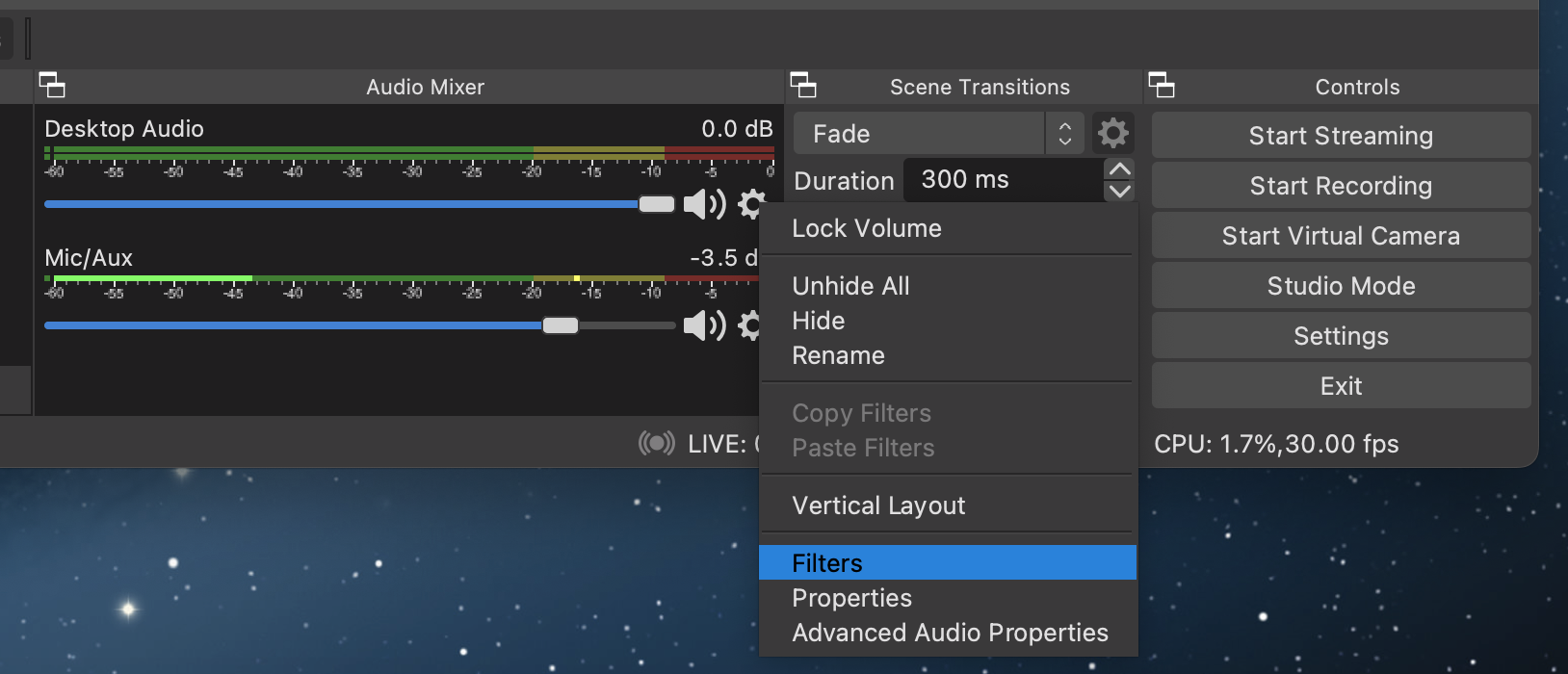
<p>You can find it by looking for the entry for your desktop audio (or whatever audio track
you want to reduce in volume whenever you speak), and click the little “gear” icon in its
lower right corner.</p>

<p><img src="/images/2023/02/ducking_filters_for_desktop_audio.png" alt="" /></p>

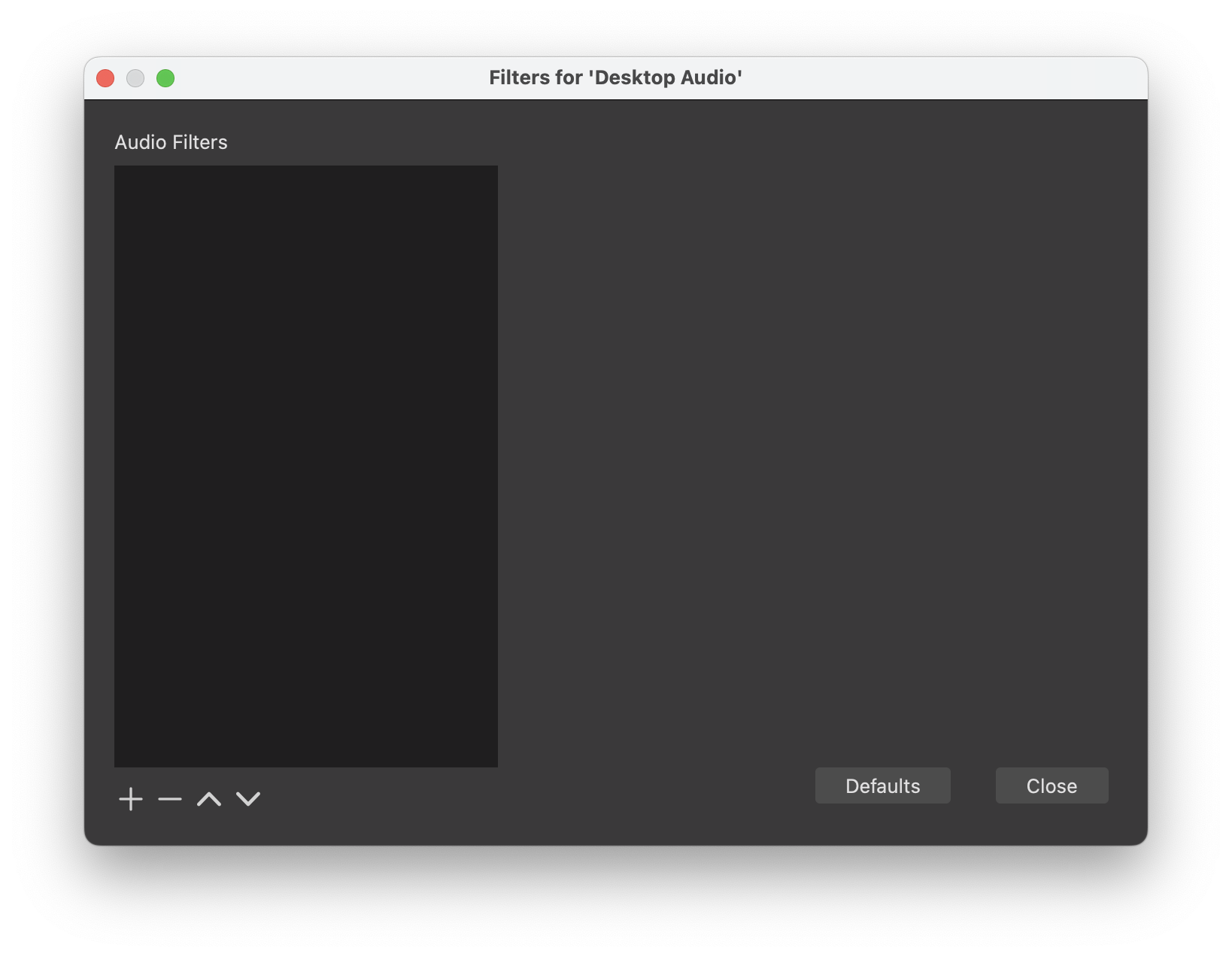
<p>That will bring up a popup menu, from which you can select “Filters” to show the filter
window.</p>

<p><img src="/images/2023/02/ducking_audio_filters_window.png" alt="" /></p>

<h3 id="2-add-the-needed-filter">2. Add the Needed Filter</h3>

<p>In that window, click the little “+” in the lower left and choose “Compressor” to add a
“compressor” filter.</p>

<p align="center"><img src="/images/2023/02/ducking_add_compressor_popup.png" width="250pt" /></p>

<p>The filter will show the following UI to configure it. Note the popup labeled
“Sidechain/Ducking Source”! We’re close!</p>

<p><img src="/images/2023/02/ducking_compressor_settings_default.png" alt="" /></p>

<h3 id="3-configure-the-filter">3. Configure the Filter</h3>

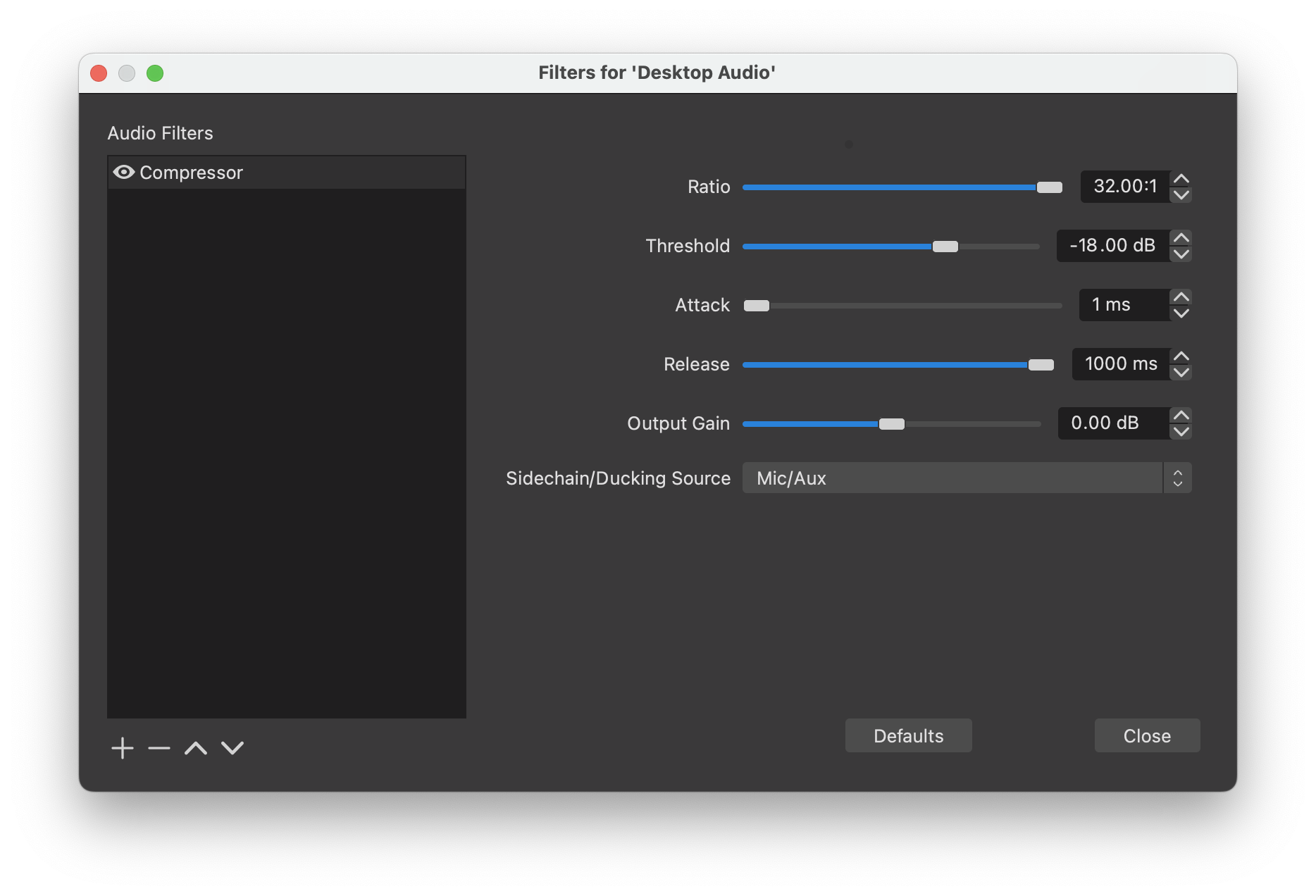
<p><img src="/images/2023/02/ducking_compressor_settings_recommended.png" alt="" /></p>

<p>The most important setting here is that you choose your microphone as the
“Sidechain/Ducking Source”. This tells the compressor to reduce the game audio in response
to input from that microphone.</p>

<p>Next we set the “Ratio” as high up as it can go (32:1). This is how strongly the game
audio will be reduced. If you want to hear more of the game audio behind your speech, you
can reduce this to 1:20 or whatever, but in general people wish it reduced even more
strongly, so this is a good starting value.</p>

<p>If you have very loud background noises or speak very softly, you will also want to adjust
the “Threshold” volume. This should be a dB number higher than any noise (so that your
radiator coming on and producing a hum doesn’t cause game audio to be lowered), but should
also be lower than the dB value the Audio Mixer in OBS shows when you speak normally, so
your speech will actually trigger it.</p>

<p>We’ve also set the “Attack” to 1ms (the lowest value possible right now, 0 would be
better) and “Release” to 1 second. This makes it so as soon as you start speaking, game
audio will be reduced. But it will stay low for about 1 second even after, so if you are
just shortly pausing in your sentence, game audio won’t come booming in.</p>

<p>Ignore the “Output Gain” slider. That’s basically a volume boost to game audio, but not
needed for ducking.</p>

<h2 id="trying-it-out">Trying it Out</h2>

<p>Click the button labeled “Close” to get rid of the Filters window and try it out. Play
back some audio and start speaking. Looking at the level meters in OBS’s Audio Mixer, you
should see the Desktop Audio meter noticeably reduce to ~⅓ of its volume while you speak,
then come back to full volume when it’s done.</p>

<p>Congratulations! You can now be heard, as can be the NPCs in your game while you’re quiet.</p>]]></content><author><name>uliwitness</name></author><summary type="html"><![CDATA[One of the difficulties when streaming games is to pick a game audio level that isn’t so loud to make it impossible to understand your commentary, but also isn’t so low that NPC conversations become inaudible without viewers constantly adjusting their playback volume.]]></summary></entry><entry><title type="html">Cross-compiling Classic Mac apps on MacOS X</title><link href="https://orangejuiceliberationfront.com/cross-compiling-classic-code-on-osx/" rel="alternate" type="text/html" title="Cross-compiling Classic Mac apps on MacOS X" /><published>2022-10-06T00:00:00+02:00</published><updated>2022-10-06T00:00:00+02:00</updated><id>https://orangejuiceliberationfront.com/cross-compiling-classic-code-on-osx</id><content type="html" xml:base="https://orangejuiceliberationfront.com/cross-compiling-classic-code-on-osx/"><![CDATA[<p>I like to do some retro programming, but SheepShaver, the best Mac emulator out there,
has a bug that makes copy and paste not function, so is kind of hard to use. I was
recently <a href="https://www.highcaffeinecontent.com/blog/20150124-MPW,-Carbon-and-building-Classic-Mac-OS-apps-in-OS-X">made aware</a>
that there is a tool named <code class="language-plaintext highlighter-rouge">mpw</code> (lowercase) that emulates <em>just enough</em> of classic MacOS
to run Apple’s MPW compiler suite’s command line tools on MacOS X. So I thought I’d give
it a try and set that up.</p>

<h2 id="installing-mpw-on-os-x">Installing MPW on OS X</h2>

<ul>
  <li>Build <a href="https://github.com/ksherlock/mpw">the <code class="language-plaintext highlighter-rouge">mpw</code> tool</a> according to the
instructions in their <a href="https://github.com/ksherlock/mpw#readme">Readme.md</a>,
basically:
    <div class="language-plaintext highlighter-rouge"><div class="highlight"><pre class="highlight"><code>mkdir build
cd build
cmake ..
make
</code></pre></div>    </div>
  </li>
  <li>Get a copy of MPW for classic MacOS (their <a href="https://github.com/ksherlock/mpw/wiki/Acquiring-MPW">Acquiring MPW page</a>
page lists some places where you can still get it if you haven’t kept your original E.T.O. or CodeWarrior CDs).</li>
  <li>Create a folder <code class="language-plaintext highlighter-rouge">~/mpw</code>.</li>
  <li>Copy the files from the <code class="language-plaintext highlighter-rouge">verbatim</code> folder in their repository into it (so you have e.g.
a <code class="language-plaintext highlighter-rouge">~/mpw/Environment.text</code> file, not <code class="language-plaintext highlighter-rouge">~/mpw/verbatim/Environment.text</code>).</li>
  <li>Open the file <code class="language-plaintext highlighter-rouge">Environment.text</code> with a text editor and change the <code class="language-plaintext highlighter-rouge">MPWVersion ?= 3.2</code>
line to match whatever version your <code class="language-plaintext highlighter-rouge">MPW Shell</code> application shows if you choose
<code class="language-plaintext highlighter-rouge">Get Info</code> on it in Finder.</li>
  <li>Open the <code class="language-plaintext highlighter-rouge">Interfaces&amp;Libraries</code> folder from your copy of MPW, and copy the <code class="language-plaintext highlighter-rouge">Interfaces</code>,
<code class="language-plaintext highlighter-rouge">Libraries</code>, <code class="language-plaintext highlighter-rouge">DebuggingLibraries</code> and <code class="language-plaintext highlighter-rouge">RuntimeLibraries</code> folders inside it to your
<code class="language-plaintext highlighter-rouge">~/mpw</code> folder (so you have e.g. a <code class="language-plaintext highlighter-rouge">~/mpw/Interfaces/CIncludes</code> folder).</li>
  <li>open the <code class="language-plaintext highlighter-rouge">MPW</code> folder of your MPW distribution and copy the <code class="language-plaintext highlighter-rouge">Tools</code> folder from there to
your <code class="language-plaintext highlighter-rouge">~/mpw</code> folder (so you have e.g. a <code class="language-plaintext highlighter-rouge">~/mpw/Tools/AboutBox</code> file).</li>
</ul>

<p>Your MPW should now be ready.</p>

<h2 id="building-the-standard-sillyballs-example-that-comes-with-mpw">Building the standard SillyBalls example that comes with MPW</h2>

<p>Create a folder named <code class="language-plaintext highlighter-rouge">mpw-sillyballs</code> to hold your project (you can choose any name here,
but that’s what I’ll call it going forward).</p>

<h3 id="obtain-the-c-source-code">Obtain the C source code</h3>

<p>Find the <code class="language-plaintext highlighter-rouge">SillyBalls.c</code> example. For MPW 3.5, it is at <code class="language-plaintext highlighter-rouge">MPW/Examples/CExamples/SillyBalls.c</code>.
Copy it into a the <code class="language-plaintext highlighter-rouge">mpw-sillyballs</code> folder.</p>

<h3 id="creating-a-resource-file">Creating a resource file</h3>

<p>Every application on classic MacOS needs a few resources that describe the application and
its UI. Those are usually defined in a resource file. You can create this resource file in
a text description language named <code class="language-plaintext highlighter-rouge">Rez</code>. We’ll create a minimal resource file named
<code class="language-plaintext highlighter-rouge">SillyBalls.r</code> that just tells the operating system about our application’s abilities:</p>

<pre><code class="language-Rez">#include &lt;SysTypes.r&gt;
#include &lt;Types.r&gt;

/* here is the quintessential MultiFinder friendliness device, the SIZE resource */

resource 'SIZE' (-1) {
	dontSaveScreen,
	acceptSuspendResumeEvents,
	enableOptionSwitch,
	canBackground,                  /* we can background; we don't currently, but our sleep value */
                                        /* guarantees we don't hog the Mac while we are in the background */
	multiFinderAware,               /* this says we do our own activate/deactivate; don't fake us out */
	backgroundAndForeground,        /* this is definitely not a background-only application! */
	dontGetFrontClicks,             /* change this if you want "do first click" behavior like the Finder */
	ignoreChildDiedEvents,          /* essentially, I'm not a debugger (sub-launching) */
	is32BitCompatible,              /* this app is safe to run in 32-bit address space */
	reserved,
	reserved,
	reserved,
	reserved,
	reserved,
	reserved,
	reserved,
	23 * 1024,        /* 23kb Preferred max. RAM */
	35 * 1024	  /* 35kb Minimal RAM limit */
};
</code></pre>

<h3 id="create-the-makefile-for-building-this-app">Create the Makefile for building this app</h3>

<div class="language-make highlighter-rouge"><div class="highlight"><pre class="highlight"><code><span class="c"># This should point to wherever you've built the 'mpw' tool from this repository:
</span><span class="nv">MPW</span><span class="o">=</span>~/Programming/mpw/build/bin/mpw

<span class="nv">RINCLUDES</span><span class="o">=</span>~/mpw/Interfaces/RIncludes

<span class="c"># 'SILB' is the unique "creator code" for this Silly Balls app, and used to associate icons
# with the app and its documents, and tell Finder to use this app to open a file. Make up
# your own unique 4-character code for your app here. All-lowercase codes are usually used
# by Apple, so use at least one uppercase letter.
</span><span class="nv">LDFLAGS</span> <span class="o">=</span><span class="nt">-w</span> <span class="nt">-c</span> <span class="s1">'SILB'</span> <span class="nt">-t</span> APPL <span class="se">\</span>
	<span class="nt">-sn</span> <span class="nv">STDIO</span><span class="o">=</span>Main <span class="nt">-sn</span> <span class="nv">INTENV</span><span class="o">=</span>Main <span class="nt">-sn</span> %A5Init<span class="o">=</span>Main

<span class="nv">PPC_LDFLAGS</span> <span class="o">=</span><span class="nt">-m</span> main <span class="nt">-w</span> <span class="nt">-c</span> <span class="s1">'SILB'</span> <span class="nt">-t</span> APPL

<span class="nv">LIBRARIES</span><span class="o">={</span>Libraries<span class="o">}</span>Stubs.o <span class="se">\</span>
	<span class="o">{</span>Libraries<span class="o">}</span>MacRuntime.o <span class="se">\</span>
	<span class="o">{</span>Libraries<span class="o">}</span>IntEnv.o <span class="se">\</span>
	<span class="o">{</span>Libraries<span class="o">}</span>Interface.o <span class="se">\</span>
	<span class="o">{</span>Libraries<span class="o">}</span>ToolLibs.o <span class="se">\</span>
	<span class="o">{</span>CLibraries<span class="o">}</span>StdCLib.o

<span class="nv">PPC_LIBRARIES</span><span class="o">={</span>SharedLibraries<span class="o">}</span>InterfaceLib <span class="se">\</span>
	<span class="o">{</span>SharedLibraries<span class="o">}</span>StdCLib <span class="se">\</span>
	<span class="o">{</span>PPCLibraries<span class="o">}</span>StdCRuntime.o <span class="se">\</span>
	<span class="o">{</span>PPCLibraries<span class="o">}</span>PPCCRuntime.o

<span class="nv">TOOLBOXFLAGS</span><span class="o">=</span><span class="nt">-d</span> <span class="nv">OLDROUTINENAMES</span><span class="o">=</span>1 <span class="nt">-typecheck</span> relaxed

<span class="nv">SOURCES</span><span class="o">=</span>SillyBalls.c

<span class="nv">OBJECTS</span><span class="o">=</span><span class="err">$</span><span class="o">(</span>SOURCES:%.c<span class="o">=</span>obj/%.68k.o<span class="o">)</span>
<span class="nv">PPC_OBJECTS</span><span class="o">=</span><span class="err">$</span><span class="o">(</span>SOURCES:%.c<span class="o">=</span>obj/%.ppc.o<span class="o">)</span>

<span class="nv">RFILES</span><span class="o">=</span>SillyBalls.r
<span class="nv">EXECUTABLE</span><span class="o">=</span>SillyBalls

<span class="nl">all</span><span class="o">:</span> <span class="nf">prepass bin/$(EXECUTABLE).ppc bin/$(EXECUTABLE).68k</span>

<span class="nl">prepass</span><span class="o">:</span>
	<span class="nb">mkdir</span> <span class="nt">-p</span> obj bin

<span class="nl">bin/$(EXECUTABLE).ppc</span><span class="o">:</span> <span class="nf">$(PPC_OBJECTS)</span>
	<span class="nv">$(MPW)</span> PPCLink <span class="nv">$(PPC_LDFLAGS)</span> <span class="nv">$(PPC_OBJECTS)</span> <span class="nv">$(PPC_LIBRARIES)</span> <span class="nt">-o</span> <span class="nv">$@</span><span class="p">;</span> <span class="se">\</span>
	Rez <span class="nt">-rd</span> <span class="nv">$(RFILES)</span> <span class="nt">-o</span> <span class="nv">$@</span> <span class="nt">-i</span> <span class="nv">$(RINCLUDES)</span> <span class="nt">-append</span>

<span class="nl">bin/$(EXECUTABLE).68k</span><span class="o">:</span> <span class="nf">$(OBJECTS)</span>
	<span class="nv">$(MPW)</span> <span class="nb">link</span> <span class="nv">$(LDFLAGS)</span> <span class="nv">$(OBJECTS)</span> <span class="nv">$(LIBRARIES)</span> <span class="nt">-o</span> <span class="nv">$@</span>
	Rez <span class="nt">-rd</span> <span class="nv">$(RFILES)</span> <span class="nt">-o</span> <span class="nv">$@</span> <span class="nt">-i</span> <span class="nv">$(RINCLUDES)</span> <span class="nt">-append</span>

<span class="nl">obj/%.68k.o </span><span class="o">:</span> <span class="nf">%.c</span>
	<span class="nv">$(MPW)</span> SC <span class="nv">$(TOOLBOXFLAGS)</span> <span class="nv">$&lt;</span> <span class="nt">-o</span> <span class="nv">$@</span>

<span class="nl">obj/%.ppc.o </span><span class="o">:</span> <span class="nf">%.c</span>
	<span class="nv">$(MPW)</span> MrC <span class="nv">$(TOOLBOXFLAGS)</span> <span class="nv">$&lt;</span> <span class="nt">-o</span> <span class="nv">$@</span><span class="p">;</span> <span class="se">\</span>

<span class="nl">clean</span><span class="o">:</span>
	<span class="nb">rm</span> <span class="nt">-rf</span> bin obj
</code></pre></div></div>

<h3 id="building-the-app">Building the app</h3>

<p>Just type <code class="language-plaintext highlighter-rouge">make all</code> in your <code class="language-plaintext highlighter-rouge">mpw-sillyballs</code> directory. The Makefile will now create a
<code class="language-plaintext highlighter-rouge">bin/SillyBalls.68k</code> and a <code class="language-plaintext highlighter-rouge">bin/SillyBalls.ppc</code> executable.</p>

<h2 id="integrating-with-clion">Integrating with CLion</h2>

<p>Since we’re running on a modern OS, I thought I’d try if I could integrate the compiler
with a modern IDE. I own CLion already and love its code navigation and refactoring
features, so I thought I’d use <a href="https://www.jetbrains.com/help/clion/custom-compilers.html">CLion’s custom compiler support</a>.</p>

<p>So as the CLion docs say, I created a compiler definition YAML file and used the little
gear popup’s “Preferences…” menu item in the upper right of the CLion window to tell my
project about this compiler definition file.</p>

<p>It gave the error “No compilation commands found.” One Stackoverflow post later, it was
revealed that CLion’s Makefile parser is probably not smart enough to recognize
<code class="language-plaintext highlighter-rouge">$(MPW) SC</code> as the same as <code class="language-plaintext highlighter-rouge">mpw SC</code> and the like. So I went and created a little shell
script <code class="language-plaintext highlighter-rouge">sc.sh</code> to wrap the emulated compiler call as a single command:</p>

<div class="language-zsh highlighter-rouge"><div class="highlight"><pre class="highlight"><code><span class="c">#!/bin/zsh</span>

<span class="c"># This script is needed so the CLion IDE will recognize the compiler and run it.</span>

~/Programming/mpw/build/bin/mpw SC <span class="nv">$@</span>
</code></pre></div></div>

<p>And then updated the Makefile to call that instead of <code class="language-plaintext highlighter-rouge">$(MPW) SC</code>, and updated the YAML
file to its final form:</p>

<div class="language-yaml highlighter-rouge"><div class="highlight"><pre class="highlight"><code><span class="na">compilers</span><span class="pi">:</span>
  <span class="pi">-</span> <span class="na">description</span><span class="pi">:</span> <span class="s2">"</span><span class="s">MPW</span><span class="nv"> </span><span class="s">SC"</span>
    <span class="na">match-sources</span><span class="pi">:</span> <span class="s2">"</span><span class="s">.*</span><span class="se">\\</span><span class="s">.c"</span>
    <span class="na">match-language</span><span class="pi">:</span> <span class="s2">"</span><span class="s">C"</span>
    <span class="na">match-compiler-exe</span><span class="pi">:</span> <span class="s2">"</span><span class="s">(.*/)?sc.sh"</span>
    <span class="na">code-insight-target-name</span><span class="pi">:</span> <span class="s">m68k</span>
    <span class="na">include-dirs</span><span class="pi">:</span>
      <span class="pi">-</span> <span class="s">${user-home}/mpw/Interfaces/CIncludes</span>
    <span class="na">defines-text</span><span class="pi">:</span> <span class="s2">"</span>
<span class="s">#define</span><span class="nv"> </span><span class="s">__SC__</span><span class="nv"> </span><span class="s">0x0801</span>
<span class="s">#define</span><span class="nv"> </span><span class="s">MPW_C</span><span class="nv"> </span><span class="s">1</span>
<span class="s">#define</span><span class="nv"> </span><span class="s">OLDROUTINENAMES</span><span class="nv"> </span><span class="s">1</span>
<span class="s">#define</span><span class="nv"> </span><span class="s">pascal</span>
<span class="s">"</span>
</code></pre></div></div>

<p>The important parts (besides using the shell script) here are:</p>

<ol>
  <li><code class="language-plaintext highlighter-rouge">match-sources</code> so it knows this compiler deals with <code class="language-plaintext highlighter-rouge">.c</code> files</li>
  <li><code class="language-plaintext highlighter-rouge">match-language</code> tells CLion’s indexer (a version of <code class="language-plaintext highlighter-rouge">clangd</code>) what to parse these
sources as.</li>
  <li><code class="language-plaintext highlighter-rouge">code-insight-target-name</code> – I was the least sure about this one. <code class="language-plaintext highlighter-rouge">m68k</code> is the usual
abbreviation for the Motorola 68000 series of CPUs of early Macs, but I couldn’t find
a list of target platforms <code class="language-plaintext highlighter-rouge">clangd</code> actually supports.</li>
  <li><code class="language-plaintext highlighter-rouge">include-dirs</code> tells the indexer where to find the system headers. This means that you
can Command-click on <code class="language-plaintext highlighter-rouge">WindowPtr</code> in a source file and it will jump to its definition in
<code class="language-plaintext highlighter-rouge">MacWindows.h</code>.</li>
  <li><code class="language-plaintext highlighter-rouge">defines-text</code> tells CLion to pretend some constants had been defined by the compiler.
Most compilers define some constants that let you detect which compiler it is. But
clangd is based on the <code class="language-plaintext highlighter-rouge">clang</code> compiler, so it doesn’t define the right ones for our
custom <code class="language-plaintext highlighter-rouge">SC</code> compiler, so we have to manually define those that would usually be defined
here.<br />
Apple’s <code class="language-plaintext highlighter-rouge">ConditionalMacros.h</code> header looks at these constants to set up some more
standardized constants no matter what compiler you’re using, so this is a good place to
find out what constants you need and what values they should have.<br />
For example, if you were setting up the PowerPC compiler <code class="language-plaintext highlighter-rouge">MrC</code>, you’d probably have to
define <code class="language-plaintext highlighter-rouge">__MRC__</code> to <code class="language-plaintext highlighter-rouge">0x0700</code> instead. I just picked the highest value that header had
for that constant. I should probably actually run this compiler in the emulator and
see what the actual value of my version is. I also decided to define away <code class="language-plaintext highlighter-rouge">pascal</code>,
because it is a keyword that <code class="language-plaintext highlighter-rouge">clang</code> otherwise displays an error on. Ideally we’d define
this to an unusual calling convention so <code class="language-plaintext highlighter-rouge">clangd</code> could possibly error if we pass a
Pascal function through a mis-matched function pointer with C calling conventions, but
I didn’t yet get around to doing all that. Also, I tried to define <code class="language-plaintext highlighter-rouge">TYPE_BOOL</code> to <code class="language-plaintext highlighter-rouge">1</code>
to keep <code class="language-plaintext highlighter-rouge">ConditionalMacros.h</code> from re-defining <code class="language-plaintext highlighter-rouge">true</code> and <code class="language-plaintext highlighter-rouge">false</code>, but it just
hard-codes that value for each compiler, so I couldn’t find a way to override it just
for CLion’s <code class="language-plaintext highlighter-rouge">clangd</code> indexer.</li>
</ol>

<p>In any event, this made CLion happy, and not only was I now able to jump to system headers
using CLion’s standard navigation, it also now let me use the little “Hammer” icon to
build my app with <code class="language-plaintext highlighter-rouge">make all</code>, and the <em>Build</em> &gt; <em>Clean</em> menu item to run <code class="language-plaintext highlighter-rouge">make clean</code>.</p>

<p>Now to set up things for the C++ compiler too, and then I can get coding.</p>

<font size="-1">PS - Some of the above description may look eerily like the `mpw`
project's Wiki. That's because there was little documentation on how to initially set up
the tool, and so I contributed an early draft of this article to their Wiki.</font>]]></content><author><name>uliwitness</name></author><summary type="html"><![CDATA[I like to do some retro programming, but SheepShaver, the best Mac emulator out there, has a bug that makes copy and paste not function, so is kind of hard to use. I was recently made aware that there is a tool named mpw (lowercase) that emulates just enough of classic MacOS to run Apple’s MPW compiler suite’s command line tools on MacOS X. So I thought I’d give it a try and set that up.]]></summary></entry><entry><title type="html">The Surprising Slowness of C++’s std::variant</title><link href="https://orangejuiceliberationfront.com/surprising-slowness-of-cpp-std-variant/" rel="alternate" type="text/html" title="The Surprising Slowness of C++’s std::variant" /><published>2020-11-28T00:00:00+01:00</published><updated>2020-11-28T00:00:00+01:00</updated><id>https://orangejuiceliberationfront.com/surprising-slowness-of-cpp-std-variant</id><content type="html" xml:base="https://orangejuiceliberationfront.com/surprising-slowness-of-cpp-std-variant/"><![CDATA[<p>I work on my own scripting language in my spare time. In this language, scripters do not
specify the type of variables, variables change type depending on what scripters put into
them.</p>

<p>This is what is commonly called a <em>variant</em>.</p>

<p>C++ comes with its own <code class="language-plaintext highlighter-rouge">variant</code> class, but it is intended for storing completely distinct
types. Given I do not really want to care what type a scripter used, and perform implicit
conversions, I could actually implement this as a class hierarchy, with a common base
class like:</p>

<div class="language-plaintext highlighter-rouge"><div class="highlight"><pre class="highlight"><code>class Value {
public:
	~Value() = default;
	
	int64_t GetAsInt64() const = 0;
	void SetAsInt64(int64_t) = 0;
	
	string GetAsString() const = 0;
	void SetAsString(const string&amp;) = 0;
};
</code></pre></div></div>

<p>and subclasses are then like</p>

<div class="language-plaintext highlighter-rouge"><div class="highlight"><pre class="highlight"><code>class Int64Value : public Value {
public:
	Value(int64_t n = 0) : mValue(n) {}
	
	int64_t GetAsInt64() const { return mValue; }
	void SetAsInt64(int64_t n) { mValue = n; }
	
	string GetAsString() const { return to_string(mValue); }
	void SetAsString(const string&amp; n) { mValue = atoll(n); }
	
protected:
	int64_t mValue;
};
</code></pre></div></div>

<p>Now the problem with this is that this provides a common interface for all types that lets
us treat them the same, but we have to know what type a variable will be at compile-time.
We still haven’t managed to make a variable <em>change type</em>. To do that, you’d have to use
operator <code class="language-plaintext highlighter-rouge">new</code>: You would <code class="language-plaintext highlighter-rouge">delete</code> and <code class="language-plaintext highlighter-rouge">new</code> it under a new type to change its type.
But that would be bad, as it would allocate a new block on the heap for each
<code class="language-plaintext highlighter-rouge">int</code>/<code class="language-plaintext highlighter-rouge">string</code> you wish to use. Performance would be ridiculously slow. Ideally, we’d want
these to be held in-line (or on the stack) like any other type.</p>

<p>Usually, you would use a <code class="language-plaintext highlighter-rouge">union</code> for that:</p>

<div class="language-plaintext highlighter-rouge"><div class="highlight"><pre class="highlight"><code>union ValueUnion {
	int64_t mInteger;
	string  mString;
};
</code></pre></div></div>

<p>But unions don’t like types with a constructor like <code class="language-plaintext highlighter-rouge">string</code>, because it doesn’t keep
track of a union’s current type, so wouldn’t know whether it would have to call
<code class="language-plaintext highlighter-rouge">~string()</code> or not. Theoretically you’d use <code class="language-plaintext highlighter-rouge">variant</code> for that (but I’ll mention below why
this doesn’t work here).</p>

<p>So what do we do? I didn’t know, until one day I remembered that C++ has what is called
<em>placement <code class="language-plaintext highlighter-rouge">new</code></em>. Placement <code class="language-plaintext highlighter-rouge">new</code> lets you provide the storage, and will then call an
object’s constructor for you. It is intended for classes like <code class="language-plaintext highlighter-rouge">vector</code>, which allocates
one large block for all elements, and then places objects inside the array one after the
other. So I added the following class:</p>

<div class="language-plaintext highlighter-rouge"><div class="highlight"><pre class="highlight"><code>union VariantUnion {
	VariantUnion() {}
	~VariantUnion() {}
	Int64Value mInteger;
	StringValue mString;
};

class alignas(union VariantUnion) VariantValue : public Value {
public:
	VariantValue(int64_t n = 0) { new (mStorage) Int64Value(n); }
	VariantValue(const string&amp; n) { new (mStorage) StringValue(n); }
	~VariantValue() { ((Value*)mStorage)-&gt;~Value(); }
	
	int64_t GetAsInt64() const { return ((Value*)mStorage)-&gt;GetAsInt64(); }
	void SetAsInt64(int64_t n) { ((Value*)mStorage)-&gt;SetAsInt64(n); }
	
	...

protected:
	uint8_t mStorage[sizeof(ValueUnion)];	
};
</code></pre></div></div>

<p>So basically its only job is to forward all calls to the underlying object. It will also
create the underlying object using placement <code class="language-plaintext highlighter-rouge">new</code> (and destruct it again using placement
<code class="language-plaintext highlighter-rouge">delete</code>, which looks like just calling the destructor directly). We have to provide the
storage ourselves (which we do by making sure that <code class="language-plaintext highlighter-rouge">mStorage</code> is large enough to hold
either of our possible types), but that is what we want, because we can just declare our
storage in-line as a fixed-size array of bytes, and forego the extra allocation.</p>

<p>So how do we make it possible to change a type? We need to destroy the current <code class="language-plaintext highlighter-rouge">Value</code>
subclass in mStorage and allocate a new one using placement <code class="language-plaintext highlighter-rouge">new</code>. I did that in my
subclasses by implementing the setters for all other types:</p>

<div class="language-plaintext highlighter-rouge"><div class="highlight"><pre class="highlight"><code>class Int64Value : public Value {
public:
	...
	
	void SetAsString(const string&amp; n) {
		((Value*)this)-&gt;~Value();
		new (this) StringVariantValue(n);
	}
	
	...
};
</code></pre></div></div>

<p>This way, if a variable is already an <code class="language-plaintext highlighter-rouge">int64_t</code>, it will just change <code class="language-plaintext highlighter-rouge">Int64Value::mValue</code>, 
but if it is another type, it will re-allocate the type in place.</p>

<p>I know this code is scary: You need to make sure that <code class="language-plaintext highlighter-rouge">ValueUnion</code> contains all your
supported types, otherwise you might over-run your memory and cause hard-to-find bugs. You
also need to make sure you use the proper alignment, because an array of <code class="language-plaintext highlighter-rouge">uint8_t</code> is
usually aligned on 1-byte boundaries, which is invalid for e.g. an <code class="language-plaintext highlighter-rouge">int64_t</code> on many
platforms. And since we’re overriding the alignment, you can’t have any other member
variables in your <code class="language-plaintext highlighter-rouge">VariantValue</code> without thinking through whether that will mis-align
<code class="language-plaintext highlighter-rouge">mStorage</code>. It also involves <code class="language-plaintext highlighter-rouge">Int64Value</code> destructing itself while its method is running
and constructing a new object in its place. And finally, <code class="language-plaintext highlighter-rouge">Int64Value</code> makes assumptions
about how large the storage its containing class has allocated for it is. That’s not
proper encapsulation.</p>

<p>On the plus side, though, usage of this class is beautifully straightforward. You just
call <code class="language-plaintext highlighter-rouge">SetAsString()</code> or <code class="language-plaintext highlighter-rouge">GetAsString()</code> and it will magically do the right thing, or
throw an exception if it can’t convert.</p>

<h2 id="so-whats-performance-like">So What’s Performance Like?</h2>

<p>In a quick test, I used an <code class="language-plaintext highlighter-rouge">array&lt;int64_t&gt;</code> as a baseline, running a loop  of 1’000’000
iterations with my programming language. That took 10ms.</p>

<p>Using the above approach, which of course replaces direct memory accesses with function
calls and a bit of virtual dispatch overhead for each <code class="language-plaintext highlighter-rouge">GetAsInt64()</code> and <code class="language-plaintext highlighter-rouge">SetAsInt64()</code>
call, doubled the runtime to 20 ms on my Mac, and to about 30ms on Windows.</p>

<p>Then I tried using C++’s <code class="language-plaintext highlighter-rouge">variant</code>:</p>

<div class="language-plaintext highlighter-rouge"><div class="highlight"><pre class="highlight"><code>inline string GetAsString() const {
	return std::visit([](auto&amp;&amp; arg) {
		using T = std::decay_t&lt;decltype(arg)&gt;;
		if constexpr (std::is_same_v&lt;T, int64_t&gt;) {
			return to_string(arg);
		} else if constexpr (std::is_same_v&lt;T, string&gt;) {
			return arg;
		} else {
			static_assert(always_false_v&lt;T&gt;, "non-exhaustive visitor!");
		}
	}, mValue);
}

inline void SetAsString(const string&amp; n) {
	mValue = n;
}

...

variant&lt;int64_t, string&gt; mValue;

...
</code></pre></div></div>

<p>This took a whopping 100ms. Given that involved a lot of fancy new constructs like lambdas
and generics, I tried going more old-school and finding the type via the
<code class="language-plaintext highlighter-rouge">variant::index()</code> for comparison:</p>

<div class="language-plaintext highlighter-rouge"><div class="highlight"><pre class="highlight"><code>inline string GetString() const {
	switch(mValue.index()) {
		case 0:
			return to_string(get&lt;int64_t&gt;(mValue));
			break;
		case 1:
			return get&lt;string&gt;(mValue);
			break;
	}
}
</code></pre></div></div>

<p>This actually got us down to 60ms. But it also lost us all the compile-time type safety
in favor of a runtime exception if someone adds a type in the middle of the
<code class="language-plaintext highlighter-rouge">variant&lt;int64_t, string_&gt;</code>’s list of types, instead of at the end. It also does not
raise any errors if we forget to implement a type like our pure virtual methods do. I also
suspect that this will perform an extra type check on the assignment on every assignment,
whereas our polymorphic approach knows when a type doesn’t change and will just go through
virtual dispatch, which likely is better for caches.</p>

<p>So we have a factor 3 slowdown at worst for the polymorphic approach, and factor 6 to 10
slowdown for C++’s built-in <code class="language-plaintext highlighter-rouge">variant</code>. Plus, given <code class="language-plaintext highlighter-rouge">variant</code> assumes wholly independent
types, the code for accessing a variant using a certain type (and performing appropriate
conversion) is a lot cleaner using polymorphism.</p>

<h2 id="so-is-cs-standard-variant-bad">So is C++’s Standard Variant Bad?</h2>

<p>I wouldn’t make that blanket statement. I haven’t got much experience with the class yet,
so I might just not be using the right call, and I have a very specific use case that
doesn’t quite match what <code class="language-plaintext highlighter-rouge">variant</code> was made to support. All I can say is that I encourage
you to not just stick <code class="language-plaintext highlighter-rouge">variant</code> into your core interpreter loop without comparing it to
other approaches. :-p</p>]]></content><author><name>uliwitness</name></author><summary type="html"><![CDATA[I work on my own scripting language in my spare time. In this language, scripters do not specify the type of variables, variables change type depending on what scripters put into them.]]></summary></entry><entry><title type="html">My Streaming Setup 2020</title><link href="https://orangejuiceliberationfront.com/my-streaming-setup-2020/" rel="alternate" type="text/html" title="My Streaming Setup 2020" /><published>2020-04-26T00:00:00+02:00</published><updated>2020-04-26T00:00:00+02:00</updated><id>https://orangejuiceliberationfront.com/my-streaming-setup-2020</id><content type="html" xml:base="https://orangejuiceliberationfront.com/my-streaming-setup-2020/"><![CDATA[<p>Given this web site is mostly a place where I write stuff up so I don’t have to remember it, but which may be of use to others as well, here’s a short rundown of my current Twitch streaming setup.</p>

<p>First, what am I <a href="https://twitch.tv/uliwitness">streaming</a>, and what features do I want?</p>

<ol>
  <li>The currently stream PS4 and PC games. I want to do this with high quality, so I opted for a capture device with a separate streaming PC setup.</li>
  <li>I want <a href="https://en.wikipedia.org/wiki/Ducking">audio ducking</a>. That is, I want game audio to be reduced in volume while I speak into the microphone, but want full game volume when I’m quiet. Too many streams have very low audio so it doesn’t conflict with their commentary, which makes it hard to follow the story.</li>
  <li>I want to have overlays that show current chat messages and my channel logo, and notifications about new followers.</li>
  <li>I want to have a bot running in the channel with which I or viewers can play sound effects.</li>
</ol>

<h2 id="why-not-ps4-built-in-streaming">Why not PS4 built-in streaming?</h2>

<p>PS4 built-in streaming is really nice:</p>

<ol>
  <li>You just push a button on the controller and you get a menu from which to start/stop the stream.</li>
  <li>It shows the chat onscreen at the right edge of the screen.</li>
  <li>The PS4 has reserved capacities for streaming, so no stutter or slowdown, even without an extra PC and hardware capture card.</li>
  <li>I can just plug in a USB headset and the mic will be used for commentary, and the headphones will play game audio without it being picked up by the headset mic.</li>
  <li>Chat notifications and other private data is automatically blurred, and switching out of the game turns off stream video, so I don’t have to worry about accidentally showing my friends list, PSN ID or private messages containing sensitive data.</li>
</ol>

<p>Sadly, it has a few downsides:</p>

<ol>
  <li>Text wrapping in the chat overlay is horrible. I think they just use Japanese-style character wrapping instead of breaking only at spaces between words.</li>
  <li>The chat overlay doesn’t show all Twitch emotes, only an older set.</li>
  <li>There is no way to call up Twitch’s web site to check how the stream sounds or whether there are compression artifacts without an extra PC.</li>
  <li>No support for a bot. I still have to run a PC for the chat bot.</li>
  <li>No game audio ducking.</li>
</ol>

<h2 id="the-setup">The Setup</h2>

<h3 id="basic-setup">Basic setup</h3>

<ol>
  <li>Elgato Game Capture HD</li>
  <li><a href="https://obsproject.com">OBS</a></li>
  <li><a href="https://www.youtube.com/watch?v=AVBm95esW7I">Elgato Sound Capture</a></li>
  <li><a href="https://amzn.to/2CoUUtt">Microsoft LifeChat LX-3000</a> headset (w. microphone)</li>
  <li><a href="https://amzn.to/2CmmzeN">Streaming PC</a> for Game Capture software, bot.</li>
  <li>Gaming PC resp. PS4 for the actual game (+ <a href="https://amzn.to/2NQgrgc">TFT Display</a>)</li>
</ol>

<p>I plug my headset into the <em>streaming</em> PC, and set up OBS so it records the audio from its microphone.</p>

<p>I plug the Elgato Game Capture HD (EGC for short) between the gaming PC and its display. The USB lead from the EGC goes into the streaming PC, which will be running OBS.</p>

<p>If you get a current EGC device, you can just turn on monitoring in OBS under “Advanced Audio Settings” to hear the game audio in the headset as it is being recorded.</p>

<h3 id="old-capture-devices-with-a-delay">Old capture devices with a delay</h3>

<p>Given my EGC is the old model that had a delay, that would come confusingly late compared to what I see onscreen. So I use the “StereoMix” device built into Windows on the gaming PC to output audio not just to the display (so it goes into the EGC), but also out the <em>line out</em> port. This is a device that is disabled by default and has to be turned on in Windows’ old Sound Control Panel (by first showing inactive and disabled devices, and then enabling the StereoMix device). The audio is fed via a <a href="https://amzn.to/2QeQQPE">jack-plug-to-jack-plug cable</a> and a <a href="https://amzn.to/2PFeHqv">Jack extension cable with in-wire volume controller</a> into the <em>microphone in</em> port of the streaming PC. I then set that <em>microphone in</em> port to output through my headset in Sound Control Panel via “Listen to this Device”, while the streaming PC’s default audio is going through <em>Elgato Sound Capture</em>. This lets me feed all audio I want recorded (i.e. bot audio) into Sound Capture, which I can still hear in my headset, but what I don’t want recorded (the un-delayed audio from <em>microphone in</em>) only ends up in my headset, circumventing Sound Capture and therefore OBS.</p>

<p>For capturing the PS4, I use a little hardware dongle called an “HDMI Audio Extractor” to fulfill the same function. It gets plugged in between the PS4 and its display somewhere, just like the EGC. But again, that’s only needed if you have a capture device that has a delay, which Elgato’s new ones don’t have.</p>

<h3 id="ducking">Ducking</h3>

<p>OBS’s “Compressor” filter includes support for “sidechain ducking”. Which means you add a <em>Compressor</em> filter to your <em>EGC</em> track by clicking its little gear icon, set its “sidechain/ducking source” audio device to your microphone and it will go quieter when you speak into that microphone. I also increased its “release” duration to 500ms (which controls how quickly the audio will go back to full volume after you start speaking, the “attack”). My Ratio is <code class="language-plaintext highlighter-rouge">32:1</code>, my threshold <code class="language-plaintext highlighter-rouge">-35dB</code>. You may want to play around a little with the ratio or threshold depending on how loud your microphone and game audio are.</p>

<h3 id="encoder-settings">Encoder settings</h3>

<p>Since my internet connection’s upstream isn’t that good and I want good quality for my YouTube archive, I’ve set up the streaming PC to <em>record</em> using the GPU encoder at <code class="language-plaintext highlighter-rouge">High</code> quality 1080p with VBR 4000/5000 kbps using nvEnc. For streaming, I use the CPU encoder at <code class="language-plaintext highlighter-rouge">fast</code> quality with x264 at 720p and 1100 kbps CBR.</p>

<p>Since the CPU- and GPU-intensive game runs on the gaming PC, the streaming PC can afford to encode twice and to scale down 1080p to 720p for streaming with no ill effect on game performance. Since one encoder runs on the GPU and another on the CPU, both have ample processing power without one taking away from the other (If you don’t have an nVidia GPU, you can likely use Intel QSV instead of nvEnc).</p>

<h3 id="bot-audio">Bot audio</h3>

<p>Elgato Game Capture for Windows comes with a “virtual audio cable” application called <a href="https://www.youtube.com/watch?v=AVBm95esW7I">Elgato Sound Capture</a>. It has a few modes to run it in. I use its “Music” mode to take the audio the chatbot plays on the streaming PC and make OBS record it (Because EGC only includes the PS4/gaming PC audio).</p>

<p>To do that, I set up Sound Capture’s output device as the default system output device, then tell Sound Capture to play back through the headset. Then I set OBS to capture desktop audio from the Elgato Sound Capture device. That way, I can hear bot audio, as the Streamlabs Chatbot plays all sounds on the default audio output device, but it also gets recorded.</p>

<p>OTOH, any other audio I set up to directly play through the headset (like the un-delayed game audio for old capture devices above) is not recorded.</p>

<h2 id="other-setup-miscellanea">Other setup miscellanea</h2>

<p>Both the PS4/gaming PC and streaming PC are plugged into wired internet, to avoid Wifi issues and get full Gigabit speeds for stream upload.</p>

<p>I also have a Blue Icicle XLR-to-USB adapter that I use with my XLR mic for better audio quality, but I prefer the headset, as it means I can turn my head to check out a noise or the clock and still remain audible. If I ever do webcam streams again (I have a Logitech C270 for that), I might forego the headset and use the mic on a separate microphone stand, and go back to the iPhone headset, which is less noticeable on cam, but I don’t want to use its microphone because I bump the mic with my chin too often.</p>

<p>My microphone stand is one of those full-height ones that you can stand on the floor, because table stands would pick up the noise and vibrations from me typing on the desk.</p>

<h3 id="disclaimer">Disclaimer</h3>

<p>The Elgato Game Capture HD was a gift from back when I worked at Elgato (I left in mid-2017). I used to work on the Mac version of Elgato Game Capture. That said, for capturing from the PS4, with overlays and all, a capture device is the only choice, so I think even if I was biased, I am not recommending anything I wouldn’t recommend otherwise.</p>]]></content><author><name>uliwitness</name></author><summary type="html"><![CDATA[Given this web site is mostly a place where I write stuff up so I don’t have to remember it, but which may be of use to others as well, here’s a short rundown of my current Twitch streaming setup.]]></summary></entry><entry><title type="html">X-Macros in C</title><link href="https://orangejuiceliberationfront.com/x-macros-in-c/" rel="alternate" type="text/html" title="X-Macros in C" /><published>2020-02-22T00:00:00+01:00</published><updated>2020-02-22T00:00:00+01:00</updated><id>https://orangejuiceliberationfront.com/x-macros-in-c</id><content type="html" xml:base="https://orangejuiceliberationfront.com/x-macros-in-c/"><![CDATA[<h2 id="what-are-x-macros">What are X-Macros?</h2>

<p>C has one neat feature that can be (ab)used to work around many of its shortcomings: The C Preprocessor, which is basically a way to define instructions for copy-and-pasting bits of text together.</p>

<p>X-Macros use this feature to let you define a list, and then generate several bits of code based on that very same list.</p>

<p>You can do this because the preprocessor lets you remove macros using the <code class="language-plaintext highlighter-rouge">#undef</code> preprocessor command so you can define them a second time with a different expansion. Let’s do an example:</p>

<div class="language-c highlighter-rouge"><div class="highlight"><pre class="highlight"><code><span class="cp">#define COLORS X(Red) \
               X(Green) \
               X(Blue)
</span>
<span class="c1">// Define an enum:</span>
<span class="cp">#define X(name) COLOR_ ##name,
</span>
<span class="k">enum</span> <span class="n">Color</span> <span class="p">{</span>
	<span class="n">COLORS</span>
	<span class="n">COLOR_COUNT</span>
<span class="p">};</span>

<span class="cp">#undef X
</span>
<span class="c1">// Define a string table:</span>
<span class="cp">#define X(name) #name,
</span>
<span class="k">const</span> <span class="kt">char</span> <span class="o">*</span> <span class="n">gColorNames</span><span class="p">[</span><span class="n">COLOR_COUNT</span> <span class="o">+</span> <span class="mi">1</span><span class="p">]</span> <span class="o">=</span> <span class="p">{</span>
	<span class="n">COLORS</span>
	<span class="s">""</span>
<span class="p">};</span>

<span class="cp">#undef X
</span></code></pre></div></div>

<p>After the preprocessor has run, that code will look like:</p>

<div class="language-c highlighter-rouge"><div class="highlight"><pre class="highlight"><code><span class="k">enum</span> <span class="n">Color</span> <span class="p">{</span>
    <span class="n">COLOR_Red</span><span class="p">,</span> <span class="n">COLOR_Green</span><span class="p">,</span> <span class="n">COLOR_Blue</span><span class="p">,</span>
    <span class="n">COLOR_COUNT</span>
<span class="p">};</span>

<span class="k">const</span> <span class="kt">char</span> <span class="o">*</span> <span class="n">gColorNames</span><span class="p">[</span><span class="n">COLOR_COUNT</span> <span class="o">+</span> <span class="mi">1</span><span class="p">]</span> <span class="o">=</span> <span class="p">{</span>
    <span class="s">"Red"</span><span class="p">,</span> <span class="s">"Green"</span><span class="p">,</span> <span class="s">"Blue"</span><span class="p">,</span>
    <span class="s">""</span>
<span class="p">};</span>
</code></pre></div></div>

<p>Allowing you to print an <code class="language-plaintext highlighter-rouge">enum Color</code> value like:</p>

<div class="language-c highlighter-rouge"><div class="highlight"><pre class="highlight"><code><span class="k">enum</span> <span class="n">Color</span> <span class="n">myColor</span> <span class="o">=</span> <span class="n">Green</span><span class="p">;</span>
<span class="n">printf</span><span class="p">(</span><span class="s">"myColor = %s</span><span class="se">\n</span><span class="s">"</span><span class="p">,</span> <span class="n">gColorNames</span><span class="p">[</span><span class="n">myColor</span><span class="p">]);</span>
</code></pre></div></div>

<p>And get the printout:</p>

<div class="language-plaintext highlighter-rouge"><div class="highlight"><pre class="highlight"><code>myColor = Green
</code></pre></div></div>

<p>Since the initial examples of this technique named the macro to be replaced <code class="language-plaintext highlighter-rouge">X()</code> (like we did it above), the technique was named that as well, and it has stuck as a convention, although you could of course pick much more expressive and self-documenting names if you wanted.</p>

<h2 id="why-would-i-use-x-macros">Why would I use X-Macros?</h2>

<p>X-Macros are very useful when you are dealing with static lists of things that need to be
kept in sync. Be it two actual lists like above, or a list and a switch statement that needs to cover all its cases in a way that follows a simple pattern. The token-pasting operator <code class="language-plaintext highlighter-rouge">##</code> and the stringify operator <code class="language-plaintext highlighter-rouge">#</code> are very handy in many such cases, to let you take the same data and use it as different data types.</p>

<h2 id="included-x-macros">Included X-Macros</h2>

<p>One downside of classic X-Macros is that, given you can’t have line breaks in a macro, all your constants end up on the same line. The definition of <code class="language-plaintext highlighter-rouge">COLORS</code> above merely escapes the line breaks, which means they’re not part of the macro output, they just break the definition up over multiple lines to make it more readable. Worse, most IDEs will jump to the <code class="language-plaintext highlighter-rouge">COLORS</code> line in the <code class="language-plaintext highlighter-rouge">enum</code> above, not to the actual definition of the <code class="language-plaintext highlighter-rouge">COLOR_Red</code> entry, when you use their code navigation feature. That makes it harder to find documentation on the individual enum cases you might have written next to the individual X-macros.</p>

<p>One workaround to this is to not define a macro for the <code class="language-plaintext highlighter-rouge">COLORS</code> list, and instead write it into a separate file:</p>

<p><strong>Colors_X.h</strong></p>
<div class="language-c highlighter-rouge"><div class="highlight"><pre class="highlight"><code><span class="n">X</span><span class="p">(</span><span class="n">Red</span><span class="p">)</span>
<span class="n">X</span><span class="p">(</span><span class="n">Green</span><span class="p">)</span>
<span class="n">X</span><span class="p">(</span><span class="n">Blue</span><span class="p">)</span>
</code></pre></div></div>

<p>and instead (ab)use <code class="language-plaintext highlighter-rouge">#include</code> to paste that header in twice:</p>

<div class="language-c highlighter-rouge"><div class="highlight"><pre class="highlight"><code><span class="c1">// Define an enum:</span>
<span class="cp">#define X(name) COLOR_ ##name,
</span>
<span class="k">enum</span> <span class="n">Color</span> <span class="p">{</span>
<span class="cp">#include</span> <span class="cpf">"Colors_X.h"</span><span class="cp">
</span>	<span class="n">COLOR_COUNT</span>
<span class="p">};</span>

<span class="cp">#undef X
</span>
<span class="c1">// Define a string table:</span>
<span class="cp">#define X(name) #name,
</span>
<span class="k">const</span> <span class="kt">char</span> <span class="o">*</span> <span class="n">gColorNames</span><span class="p">[</span><span class="n">COLOR_COUNT</span> <span class="o">+</span> <span class="mi">1</span><span class="p">]</span> <span class="o">=</span> <span class="p">{</span>
<span class="cp">#include</span> <span class="cpf">"Colors_X.h"</span><span class="cp">
</span>	<span class="s">""</span>
<span class="p">};</span>

<span class="cp">#undef X
</span></code></pre></div></div>

<p>Each X-Macro is now really on its own line, resulting in the preprocessed code:</p>

<div class="language-c highlighter-rouge"><div class="highlight"><pre class="highlight"><code><span class="k">enum</span> <span class="n">Color</span> <span class="p">{</span>
    <span class="n">COLOR_Red</span><span class="p">,</span>
    <span class="n">COLOR_Green</span><span class="p">,</span>
    <span class="n">COLOR_Blue</span><span class="p">,</span>
    <span class="n">COLOR_COUNT</span>
<span class="p">};</span>

<span class="k">const</span> <span class="kt">char</span> <span class="o">*</span> <span class="n">gColorNames</span><span class="p">[</span><span class="n">COLOR_COUNT</span> <span class="o">+</span> <span class="mi">1</span><span class="p">]</span> <span class="o">=</span> <span class="p">{</span>
    <span class="s">"Red"</span><span class="p">,</span>
    <span class="s">"Green"</span><span class="p">,</span>
    <span class="s">"Blue"</span><span class="p">,</span>
    <span class="s">""</span>
<span class="p">};</span>
</code></pre></div></div>

<p>And moreover, the compiler keeps track of line numbers in included files, and when you trigger code-navigation on a <code class="language-plaintext highlighter-rouge">COLOR_Red</code> identifier in your source code, it will now jump to the <code class="language-plaintext highlighter-rouge">X(Red)</code> line in <code class="language-plaintext highlighter-rouge">Colors_X.h</code>, as desired.</p>

<p>But of course the enum and strings array definitions look even less readable now, and you need a separate file for each and every enum.</p>

<h2 id="should-i-use-x-macros-in-my-code">Should I use X-Macros in my code?</h2>

<p>In general, I would avoid using X-Macros. That I got an entire blog post out of the technique should show you that they are not obvious, and the caveats I gave above should show you that X-Macros have their own issues. That said, if you have a C codebase that consists of numerous static look-up tables that need to be kept in sync, X-Macros are likely the least horrible solution. If having out-of-sync tables can lead to hard-to-diagnose bugs, a little education to every new hire about X-Macros via a comment is a small price to pay. So sure, use them there if you can’t use statically declared structs instead.</p>

<p>After all, if you’re already forced to use C instead of a higher-level programming language, you probably have many constraints on you already, and X-Macros might actually lead to more readable and more maintainable code.</p>]]></content><author><name>uliwitness</name></author><summary type="html"><![CDATA[What are X-Macros?]]></summary></entry></feed>